10 min read

ERP Software Solution Comparison - How to Compare


Step one - understand why you’re leaving your current system and quantify the pain

A cloud ERP comparison framework gives you a repeatable way to score vendors against the same criteria instead of relying on sales pitches. Define your goals, shortlist true‑cloud options, and rate each system on fit, total cost, and risk so you can defend your decision to your leadership team.

Before you compare any cloud ERP systems, get clear on why you are changing at all. List the concrete problems with your current tools: delayed month‑end close, manual re‑keying between QuickBooks and spreadsheets, inventory write‑offs, or lack of real‑time visibility. Put numbers against each issue where you can, hours lost per month, error rates, or the dollar value of late shipments.

External research shows why this discipline matters. A recent analysis cited by ERP Software Guide notes that average ERP investments can reach around $9,000 per user and that more than 47% of organizations exceed their original budget. When the stakes are that high, going into vendor conversations without quantified pain is effectively rolling the dice.

Capture these numbers in a simple baseline worksheet. For example, if your team spends 200 hours a month manually consolidating spreadsheets at an average fully loaded cost of $50 per hour, that is $10,000 a month, or $120,000 a year, just in labor. That figure becomes one of the benchmarks you use later when you assess whether a proposed cloud ERP can realistically deliver savings.

Define must‑have cloud ERP capabilities and industry fit

Once your pain points are quantified, translate them into specific, testable ERP capabilities. Instead of “better reporting,” define “consolidated financial statements across three entities, refreshed at least every hour, visible on mobile.” For inventory issues, you might require lot and serial tracking, scan‑gun support, and real‑time available‑to‑promise across locations.

Industry fit is just as important as generic functionality. A construction firm, a distributor, and a make‑to‑order manufacturer may all evaluate the same vendors, but the underlying requirements are very different. Look for cloud ERP editions or configurations designed for your industry, then verify that the workflows, change orders, kitting, project accounting, or service contracts, match how you actually operate.

Independent guides, such as the checklist from ERP Software Guide, consistently highlight five pillars: business requirements, technology architecture, integration, total cost of ownership, and vendor assessment. Use these as headings in your own requirements document and capture both “must‑have” and “nice‑to‑have” capabilities under each.

As you document requirements, avoid the temptation to simply copy a vendor feature list. Walk through real scenarios, like processing a warranty return or drop‑shipping from a supplier, and note what information, approvals, and system interactions are needed. This specificity will later drive much sharper questions in demos and help you avoid buying capabilities you do not need.

Build a disciplined ERP shortlist and scripted vendor demos

With requirements in hand, you can build a shortlist instead of taking every demo offered to you. Aim for three to five cloud ERP vendors that appear to serve your size, industry, and region. Include at least one option that feels like a “stretch” and one that feels conservative so you understand the trade‑offs between innovation and familiarity.

The next step is to design a scripted demo. Rather than letting vendors run their standard slide deck, give each of them the same three to five end‑to‑end scenarios based on your real processes. For example, “quote to cash for a custom manufactured item,” “project setup to closeout,” or “eCommerce order to warehouse shipment.” Ask them to show exactly how the system supports each step.

Research from sources such as Oasis Techno Cloud emphasizes that most ERP selections fail because teams start with demos instead of process definition. You are deliberately reversing that sequence. Your scripted demo should also include a few “edge cases”, rush orders, partial shipments, or returns, because those are where real‑world systems often struggle.

During each demo, have evaluators score what they see immediately on a 1–5 scale against your predefined criteria. Capture comments about usability, navigation, and how well the workflows match your current and desired processes. This transforms demos from showpieces into structured data you can compare later.

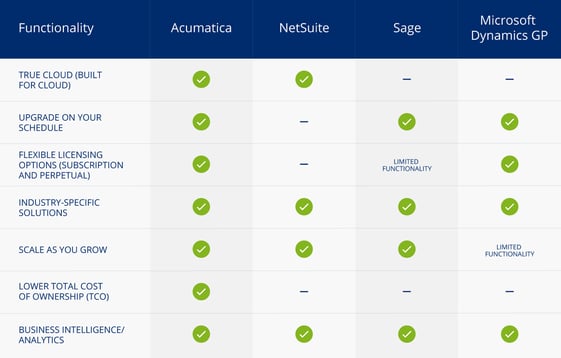
Here is a high level overview comparing market leading Cloud ERP solutions:

ERP Platform Primary Target Industries Licensing / Pricing Model Core Strengths Ecosystem & Integration Strengths Key Considerations / Trade-offs
Acumatica Cloud ERP Manufacturing, Wholesale Distribution, Construction, Retail/eCommerce Consumption-based (charged by transactions/resource usage, not named user seats) True cloud-native architecture; strong field service and project accounting; flexible deployment options. Modern REST APIs; broad xRP platform capabilities; smooth third-party ISV integrations. Pricing depends on transaction volume growth; requires careful sizing during scoping.
Oracle NetSuite General Midmarket, High-Growth SaaS, Retail, Professional Services Named User Subscription (base fee + per-user/month fee + module add-ons) Comprehensive all-in-one suite; mature multi-subsidiary and multi-currency consolidation (OneWorld). Expansive SuiteCloud developer platform and SuiteApp partner marketplace. Costs scale quickly as user counts and modules grow; custom reporting can require specialized skills.
Microsoft Dynamics 365 Business Central Wholesale Distribution, Discrete Manufacturing, Professional Services Named User Subscription (Essential or Premium per user/month tiers) Deep, native integration with Microsoft 365, Azure, Power Platform, and embedded Copilot AI. Huge AppSource ecosystem; familiar Microsoft UI; flexible Power Apps / Power Automate extensions. Advanced manufacturing or complex enterprise setups may require third-party add-ons or enterprise D365 Finance.
Sage Intacct Financial Services, Professional Services, Non-Profit, SaaS/Tech Named User / Module Subscription (annual SaaS subscription) Best-in-class multi-entity financial management, complex revenue recognition, and automated consolidation. Robust open API framework; seamless integration with Salesforce and best-of-breed operational software. Focused primarily on financials; relies on ISV integrations for full WMS, MRP, or complex supply chain operations.
SAP S/4HANA Cloud (Public Edition / GROW with SAP) Industrial Manufacturing, Automotive, Wholesale, Chemicals Named User Subscription (FUE - Full User Equivalent model) Deep industry-standard process templates; powerful MRP and operational analytics powered by SAP HANA. Standardized SAP Business Technology Platform (BTP); pre-configured side-by-side extensibility. Rigorous "fit-to-standard" implementation methodology; less flexible for highly off-spec custom processes.
Infor CloudSuite (Industrial / SyteLine) Complex Manufacturing, Industrial Equipment, Process & Discrete Production Named User Subscription Deep out-of-the-box manufacturing capabilities (advanced planning and scheduling, shop floor control, quality management). Infor OS integration platform; pre-built industry-specific data models and vertical analytics. UI and administrative tools can have a steeper learning curve for non-technical users.

Score cloud architecture, scalability, and integration readiness

Many ERP buyers focus on features and screens, but the underlying cloud architecture determines how the system will behave when your business doubles. According to research summarized by BusiStack, the global cloud ERP market is growing at roughly 14.5% annually, nearly doubling in size every five years. That growth brings more vendors, and more variation in what “cloud” actually means.

For each shortlisted system, ask direct questions about whether it is true multi‑tenant cloud, how upgrades are handled, and what control you have over timing. Probe API capabilities: available endpoints, rate limits, and whether modern standards like REST and webhooks are supported. If you rely on eCommerce, EDI, or specialized shop‑floor systems, integration depth may matter more than any individual screen.

Score scalability by looking at both technical limits and commercial models. Can the database handle increased transaction volumes and new entities without performance degradation? How does pricing change if your user count or locations double? Use a simple scoring rubric (for example, 1 = does not meet needs, 3 = adequate, 5 = strong fit) and document the evidence behind each score.

Aqurus often highlights “true cloud” characteristics, browser‑based access, no local client installs, and resource scaling on demand, when discussing Acumatica and its peers. Apply the same lens across all vendors so you can separate marketing claims from concrete architectural choices that affect your long‑term flexibility.

Compare total cost of ownership, licensing, and project risk

License price is only a fraction of the real cost of a new ERP. The evaluation checklist from ERP Software Guide notes that implementation services often run 100–200% of license fees, with data migration adding another 10–15% and training ranging from $500 to $2,000 per user. Ignoring these factors is a common reason projects run far over budget.

Build a basic total cost of ownership (TCO) model for each vendor over a five‑year horizon. Include subscription or license fees, implementation, integrations, data migration, training, internal backfill for key staff during the project, and ongoing support. Add a contingency line, often 15–20%, to reflect the reality that requirements evolve during implementation.

You should also weigh project risk explicitly. Panorama Consulting’s 2024 ERP Report, cited by BusiStack, found that 64% of ERP projects experience budget overruns and only 49% go live on schedule. Ask each implementation partner for their own track record by project size and industry, and request references that match your profile as closely as possible.

Finally, consider licensing structures. Some cloud ERPs charge per named user, others per resource usage, and some, like Acumatica, emphasize usage‑based models. Model at least two growth scenarios, steady and aggressive, to see how each structure behaves. The “cheapest” option in year one may not be the lowest‑risk or lowest‑cost option by year five.

Turn your ERP comparison into a defensible decision story

After demos, reference checks, and TCO modeling, you will have a lot of data. The final step is to turn that information into a clear decision story you can present to executives, investors, or a board. This narrative should explain the problem, the options you considered, how you evaluated them, and why your recommendation is the best fit given your constraints.

Start by summarizing your quantified pain and business goals: for example, reducing manual reporting hours by 60%, cutting order‑to‑cash cycle time by five days, or enabling remote work for finance and operations teams. Then show how each vendor scored against your core criteria: process fit, architecture, integration, TCO, and vendor strength.

A simple comparison matrix can make this concrete. List criteria down the left, vendors across the top, and show 1–5 scores with brief notes. Highlight not just the “winner,” but the trade‑offs, for instance, one system may offer deeper manufacturing functionality while another provides stronger embedded analytics.

Close with implementation considerations: the timeline, internal resources required, and the key risks and mitigations you have identified. Independent studies consistently show that rigorous upfront evaluation dramatically increases the odds of ERP projects meeting ROI expectations. By following a structured comparison framework rather than chasing the flashiest demo, you put your organization on the more successful side of those statistics.

What does “true cloud ERP” really mean for your business?

A cloud ERP features checklist starts with whether the system is truly cloud-native. True cloud ERP is built for the cloud from day one, delivered via the browser, updated continuously, and priced as a service, which reduces upfront hardware costs and simplifies remote access for your team.


In practice, that means your users log in through a standard web browser with no local software installs or VPN clients. Servers sit in a provider’s data center rather than your own, so you do not buy or maintain ERP hardware. 


How should you think about ERP upgrades and release schedules?

Modern ERP vendors ship new versions several times a year, but the impact on your business depends on how upgrades are managed. You want a system that delivers regular improvements while still letting you choose when to turn on major changes in production.

In practical terms, look for a schedule you can see in advance and tools that let you test new releases in a sandbox environment. That gives you time to validate critical processes like order-to-cash or purchasing before changes hit live users. It also lets you plan upgrades around busy seasons instead of being forced into a date that clashes with peak demand.

Ask vendors these FAQ-style questions:

  • Can we control when our instance moves to a new major version?
  • How long are older versions supported before we must upgrade?
  • What’s the typical downtime window, and when does it occur?

Research on cloud ERP adoption shows that hidden upgrade constraints can drive unplanned overtime and consulting spend. 

Which ERP licensing options work best for growing SMBs?

Licensing determines how easily you can add users or modules as your company grows. Most ERP platforms offer subscription (operating expense) or perpetual (capital expense) models, and some permit a mix. The right choice depends on your cash flow, growth rate, and appetite for long-term commitments.

For SMBs, subscription licensing is often easier to align with headcount changes. You pay per user or resource each month or year and can scale up or down over time. This is especially helpful if you use seasonal labor or expect to add new locations in the next few years.

When you evaluate licensing, turn it into a short FAQ for each vendor:

  • How are user types priced (full, limited, warehouse-only)?
  • Are there separate fees for modules like CRM, EDI, or advanced inventory?
  • What happens to our costs if we double user count over three years?

Industry observers increasingly recommend modeling three-to-five-year license scenarios rather than just first-year spend, because unexpected user growth is a common driver of budget overruns.

Why do industry-specific ERP editions matter during selection?

There is no such thing as a truly “one-size-fits-all” ERP. Industry-specific editions bundle configurations, reports, and workflows that match common patterns in fields like distribution, construction, manufacturing, or field service, reducing customization effort and implementation risk.

For example, a distribution-focused edition might include multi-warehouse inventory, lot and serial tracking, and common EDI transaction sets out of the box. A construction edition might prioritize project accounting, retainage handling, and certified payroll. Without these prebuilt capabilities, you may end up funding customizations that are standard elsewhere.

When you compare vendors, ask:

  • Which industries does this edition explicitly target?
  • How many customers in our industry are live on this version today?
  • Which features are delivered as standard versus custom work?

Independent buyer guides stress that industry fit and implementation risk, not the length of a feature list, are the real determinants of ERP success. Treat industry editions as a starting point, then validate that they map closely to your core processes.

How do scalability and total cost of ownership (TCO) connect?

Scalability and total cost of ownership (TCO) are tightly linked. True cloud ERP lets you add users, environments, or storage without buying new hardware, which flattens capital expenditures. A 2026 market report cited by prepared.cloud projects cloud ERP spending to exceed $200 billion by 2030, driven in part by this economic flexibility.

To translate that into your own numbers, model how costs change when transaction volume doubles or you expand into new regions. In a scalable cloud model, infrastructure and license costs should rise in a predictable, roughly linear way, not spike when you cross arbitrary thresholds.

Key TCO questions to include in your internal FAQ:

  • What infrastructure costs do we avoid by not running ERP servers?
  • Are there additional fees for storage, environments, or high API usage?
  • How do upgrade, support, and training costs compound over five years?

Remember that implementation services, data migration, and change management often outweigh license costs. A vendor with transparent scaling rules but a chaotic implementation model can still produce an unexpectedly high TCO.

What role do business intelligence and analytics play in ERP?

ERP systems generate large volumes of operational and financial data, but value comes from how well you can turn that data into decisions. Built-in business intelligence (BI) and analytics should help you move beyond spreadsheets to dashboards, alerts, and drill-downs that non-technical users can manage.

At a minimum, your ERP should support role-based dashboards for finance, sales, operations, and inventory, with the ability to filter by date, location, and product. More advanced systems provide embedded analytics, KPI scorecards, and self-service reporting so power users can explore data without IT tickets.

To assess analytics capabilities, ask:

  • Can business users build or modify reports without developer help?
  • Which KPIs are available out of the box for our industry?
  • How easily can we export or share data with external BI tools?

Industry reports consistently link better data visibility to faster decision cycles. Even modest improvements — such as reducing manual spreadsheet consolidation by a few hours per week per manager — can add up to hundreds of productivity hours per year, making BI a central factor in your ERP selection process.

Key Benefits of a Feature-Rich ERP Software Solution

Now that you have a better understanding of the criteria by which we are comparing these ERP software solutions, it’s essential to understand the benefits these features pose for your business – no matter what industry you’re in.

Streamlined Operations

  • Store and track data from across the organization– including third-party integrations, to consolidate and streamline business functions

Workflow Automation

  • Automate routine processes and free up human capital with AI and machine learning.

Advanced Analytics

  • Get big-picture insights and gauge the success of business initiatives with detailed reporting and analytics dashboards.

Enhanced Accessibility

  • Utilize IoT-enhanced platforms such as cloud-based software and mobile apps for better visibility into daily operations.

Acumatica is an integrated financial, CRM, and business management solution that helps you run your business more effectively. We believe Acumatica provides the best price/value, performance, functionality, and ease of use of any ERP system available for SMBs. All of the competitors we will compare Acumatica to over the next few weeks make a viable ERP product. We think Acumatica is better, and we hope these articles show you why.

Ultimately, the decision of which ERP system you choose is yours. We want you to get the ERP system that is right for you – whether or not you choose Acumatica. There is one thing we can say about our competitors: All the products listed here will charge you for every user you add to their system. Acumatica does not. Ever.

Need more information on the software? Check out the overview of Acumatica Cloud ERP Software.


What is ERP Software for Small and Medium Sized Businesses?

What is ERP Software for Small and Medium Sized Businesses?

What is ERP Software? If your business uses QuickBooks, spreadsheets, or an outdated business management accounting system, you might ask yourself,...

Read More
Implement ERP Software and Manage Your Entire Business

Implement ERP Software and Manage Your Entire Business

Implement ERP Software and Manage Your Entire Business on a Single, Future-Proof Cloud Platform

Read More