Manufacturing ERP systems connect production, inventory, purchasing, sales, and finance so teams can manage operations through shared business records. Manufacturing-focused platforms extend those connections into materials planning, scheduling, and production control. This article explains what to evaluate, where industry requirements matter, and how to choose software around the work your factory actually performs.
What are manufacturing ERP systems?
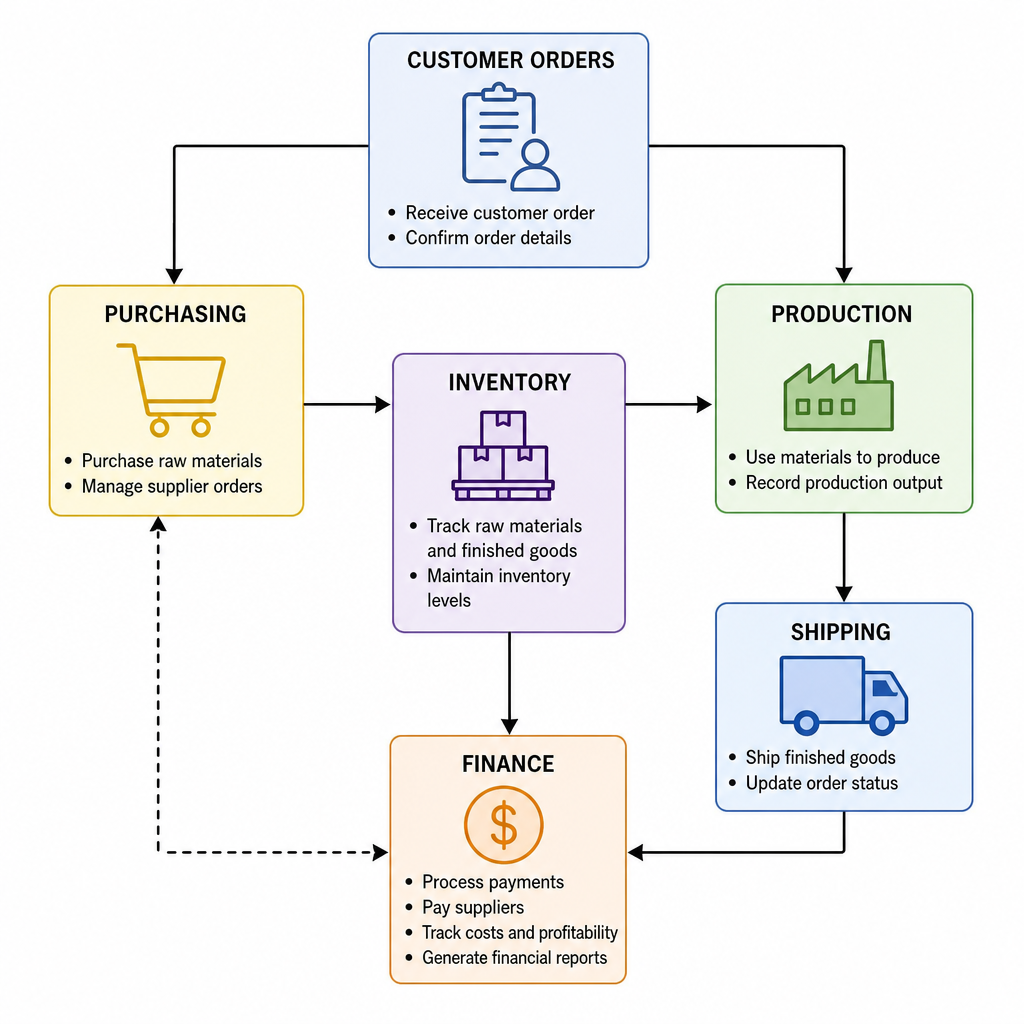
Manufacturing enterprise resource planning systems are integrated business applications that coordinate the commercial, financial, and production activities involved in making goods. Rather than treating purchasing, inventory, and manufacturing as separate functions, they connect transactions across those processes. Their purpose is to help teams plan work, record execution, and understand the operational and financial results.
Consider a customer order for an assembled product. In a connected workflow, that demand informs material requirements and production planning; manufacturing activity then updates inventory and contributes to production cost analysis. Bills of materials, routings, resources, and production orders provide the underlying structure for that process.
When comparing manufacturing software systems, separate the breadth of an ERP from the specific functions you need. Ask vendors which activities their core application handles, which require additional modules, and which depend on integrations. Treat “included” as something to verify in a demonstration, not a promise that every workflow is ready to use.
Start with your production model
Describe your manufacturing process before building a feature checklist. Document what triggers production, how materials move, how work is scheduled, and where supervisors make exceptions. Use those details to challenge each proposed solution rather than adapting your requirements to a vendor’s preferred demonstration.
Manufacturing environments can involve make-to-stock, make-to-order, configure-to-order, project-based, and process manufacturing workflows. Some operations combine several approaches, so a product label alone does not establish fit. Evaluate the actual planning and execution paths your business needs.
Build your requirements around concrete scenarios:
- Repeat assemblies: Demonstrate component requirements, routing changes, and recording completed quantities.
- Custom orders: Follow a customer-specific requirement from quotation through production and cost review.
- Batch production: Show formula revisions, ingredient consumption, actual yield, and finished-lot identification.
- Mixed operations: Test how the system connects fabricated components, assembly, and outsourced work.
Bring one routine order and one troublesome order to each demonstration. The second should expose the exceptions your team currently handles outside the system.
Evaluate capabilities through everyday decisions
Translate feature names into questions employees need answered. Can purchasing identify a shortage before releasing an order? Can a supervisor see what prevents a job from starting? Can finance explain why actual production costs differ from expectations?
Use the following checklist to structure demonstrations and record gaps:
| Capability |
What to ask vendors to demonstrate |
| Materials planning |
Recalculate requirements after a demand change or delayed receipt. |
| Capacity and scheduling |
Show resource constraints and the consequences of moving a job. |
| Inventory control |
Separate available, allocated, and restricted stock. |
| Production reporting |
Record consumption, completed quantities, scrap, and unfinished work. |
| Cost analysis |
Trace reported costs back to the transactions behind them. |
| Quality and traceability |
Identify material origins and affected production or shipments. |
Traceability deserves a practical test rather than a checkbox. Ask each supplier to demonstrate equivalent coverage for your required identifiers, including any limitations.
Food manufacturing needs a closer fit
When evaluating food manufacturing ERP systems, give recipes, batches, shelf life, and ingredient variability their own acceptance criteria. Process-manufacturing capabilities can include formula management, batch execution, lot-specific unit conversions, and controls that prevent expired materials from being used. Verify the exact capabilities and configuration offered rather than assuming every manufacturing package provides them.
Ask vendors to demonstrate an ingredient substitution, a partial batch, and a finished product created from multiple input lots. Then request both backward and forward tracing: which ingredients entered the finished lot, and where did products containing a selected ingredient lot go? Ingredient-to-product lot relationships are a specific traceability capability worth inspecting closely.
Include quality staff in these sessions. Have them test how records support a hold, investigation, release, and mock recall. Ask how allergen information and labeling requirements are handled, and distinguish software support from the operating procedures your business must maintain.
Assess cloud deployment beyond convenience
Cloud ERP solutions deliver applications and computing resources through a network-accessible service model. That changes how infrastructure is obtained and managed, but it does not remove the need to evaluate availability, security, service terms, and operational risks.
Request written answers about responsibilities before signing. Who manages application updates, user permissions, backups, and recovery testing? What happens during a connectivity interruption, and how will the plant record work until access returns? Make those answers part of your deployment assessment.
Also ask how you retrieve your data if you leave. Request the export formats, available transaction history, attachments, and any associated services. Compare cloud and on-premises proposals using the same operating requirements rather than treating either deployment model as automatically preferable.
Keep small-company requirements focused
When assessing ERP systems for small manufacturing companies, prioritize the workflows that need dependable control first. Your initial scope might cover purchasing, stock accuracy, production orders, and accounting connections. Add requirements only when you can explain who will use them and what decision or control they support.
Create three requirement groups: essential at launch, necessary for a defined growth plan, and optional. Assign an internal owner to every essential workflow. This makes scope discussions more concrete and gives your team a basis for rejecting attractive but unnecessary extras.
Test usability with the people who will do the work. Ask a buyer to receive a partial delivery and an operator to record a production exception. During the exercise, note every spreadsheet, duplicate entry, and administrator intervention still required. Use those observations to judge whether the proposed system is manageable for your team.
How do you choose the right ERP for your factory?
Choose ERP for manufacturers by testing operational fit, implementation readiness, and ownership costs against documented requirements. A useful shortlist should show how each candidate handles your critical workflows, where gaps remain, and what resources deployment requires. Treat lists of the top ERP systems for manufacturing as research starting points, not substitutes for that evidence.
Use a consistent evaluation process:
- Define outcomes. Identify the problems you want to address, such as unexplained inventory differences or slow job-cost reviews.
- Write demonstration scripts. Supply representative orders, materials, exceptions, and expected results.
- Record gaps. Label each requirement as standard functionality, configuration, integration, customization, or unsupported.
- Compare ownership costs. Request licensing, implementation, migration, training, integration, support, and ongoing administration costs.
- Check delivery capability. Ask who will configure the system, resolve issues, and support your team after launch.
Score the evidence immediately after each demonstration. Keep usability, process coverage, and delivery confidence separate so an impressive interface does not conceal a serious operational gap.
Plan implementation before committing
Evaluate ERP software solutions alongside a realistic deployment plan. Implementation emphasizes data migration validation, user acceptance testing, integration testing, and production readiness. These activities should be visible in the proposal, with owners and acceptance criteria, rather than deferred until the software has been purchased.
Start by reviewing item records, units of measure, bills of materials, supplier details, and inventory balances. Decide what history to migrate and how the team will verify it. Run trial migrations and reconcile the results before approving the final transfer. Test complete workflows under realistic conditions, including integrations and expected transaction loads. Train users on their actual responsibilities and rehearse the cutover sequence. Define who can approve launch, what would delay it, and where employees should report problems during stabilization.
Choose for operational fit
The strongest selection process starts with your factory’s work, not a product ranking. Document the decisions you need to improve, demonstrate the difficult scenarios, and make unresolved gaps visible before committing.
A practical next step is to assemble a cross-functional requirements workshop. Leave with a prioritized workflow list, named owners, and a demonstration script. That gives every vendor the same test—and gives your team a clearer basis for choosing.

 Aqurus Solutions


 Murray Quibell : Jul 7, 2026, 2:58:15 PM